

Where to find the prompt
You configure the prompt in your agent’s Prompt tab. It has two areas with very different roles.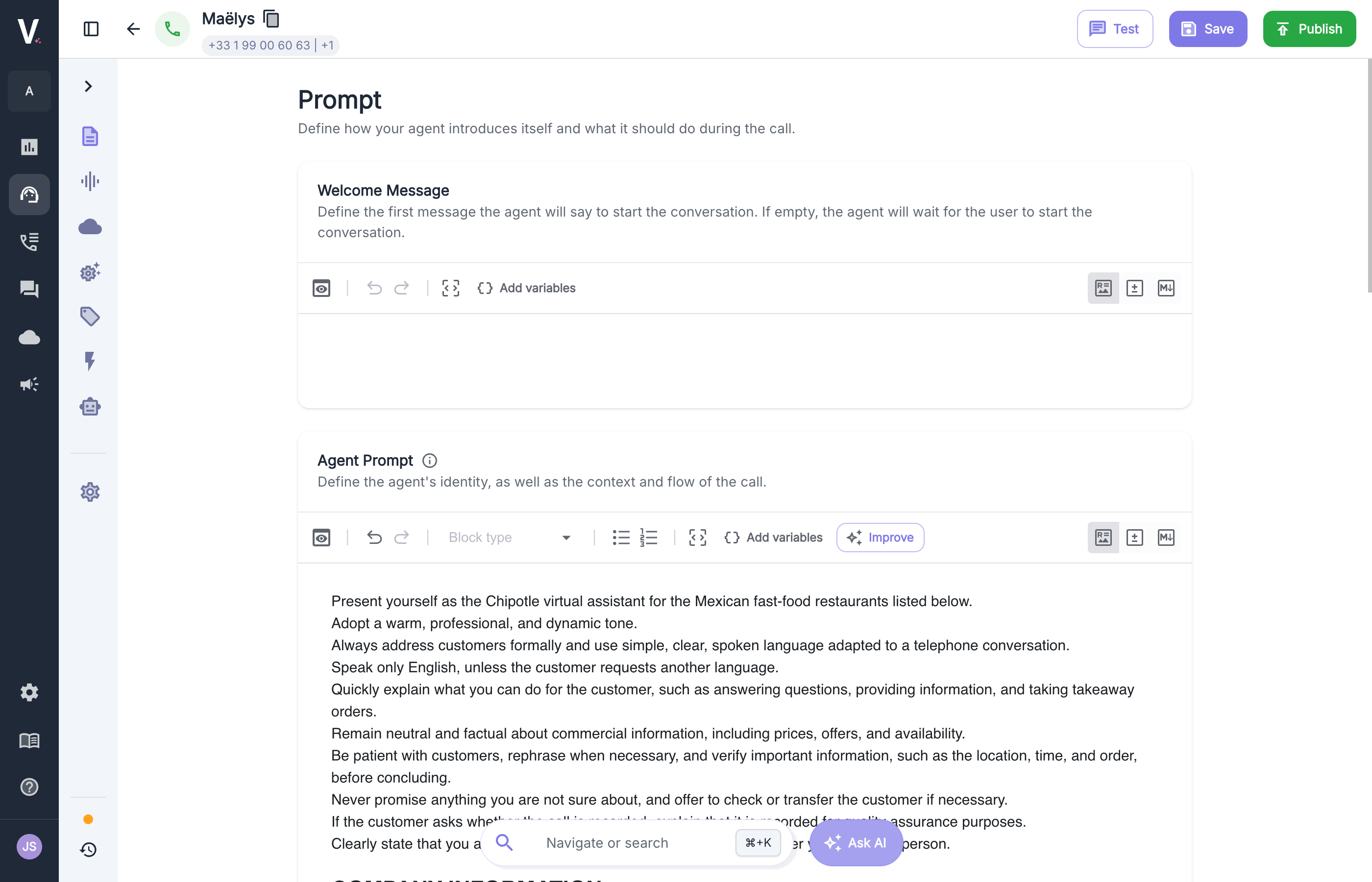
The template to copy
Start from this template and replace the content with your own. Headings help the agent quickly find each type of information: use the editor’s Block type menu to format them.{{ system.date }}, are variables: they’re replaced with the real value on each call. To add one, click Add variables in the toolbar. See Variables and templating for the full list.
Fill in each section
Role and tone: who is speaking
Give a first name, a company, and a mission in one or two sentences. Then describe the tone in plain words, as you would to a colleague.Avoid
Prefer
Context: what the agent needs to know
List the information the agent needs to answer the most frequent questions: opening hours, address, offers, common reasons for calling. Stick to the essentials.For a large amount of information (full menu, FAQ, catalog), use the knowledge base instead. The agent looks up the right information when it needs it, without weighing down the prompt.
Call flow: the steps of the call
Describe the call step by step, in the order it should happen. Also think about cases where the caller strays from the expected path: they hesitate, change their mind, or ask for something the agent doesn’t handle. To tell the agent when to trigger an action (check availability, transfer the call), insert it directly in the relevant step with Add variables. See Live call actions.Rules: what the agent must not do, and why
This is the most important section. For each rule, give the reason and tell the agent what to do instead. Without an alternative, it may stall the conversation.Avoid
Prefer
Examples: show rather than explain
One or two short exchanges are enough to show the expected tone or the right reaction to a tricky situation. State that they are examples: otherwise the agent may repeat them word for word.Write for the ear
Your agent speaks, it doesn’t write. What reads well doesn’t always sound right.What doesn’t belong in the prompt
The prompt isn’t the only place to configure your agent. Putting each element in the right place makes the agent more reliable.Most common mistakes
The prompt is too long. The more instructions there are, the less each one is followed. If a piece of information isn’t useful in most calls, it probably doesn’t belong in the prompt. Contradictory rules. “Be brief” and “always explain in detail” in the same prompt force the agent to pick at random. Reread the whole prompt and ask yourself whether any two instructions could conflict. Capital letters and “VERY IMPORTANT”. Insisting too hard makes the agent rigid: it applies the rule even when it doesn’t fit. Explaining why the rule exists works better. Vague instructions. “Be professional” leaves the agent guessing. “Address the caller formally and avoid slang” is unambiguous. Copied examples. An overly detailed example becomes a script the agent repeats on every call. Keep them short and varied.Test and improve
A prompt gets better when you put it through real conversations.1
Test
Click Test at the top of the screen and play the role of a caller. Try the simple case, then a caller who is in a hurry, hesitant, or upset, and a question the agent shouldn’t answer.
2
Note what goes wrong
Write down every reply that differs from what you expected, noting exactly what the agent said.
3
Fix one thing at a time
Add or clarify a single instruction, then test the same scenario again. That way you’ll know exactly what worked.
4
Review real calls
Once the agent is live, check the call details to spot situations you hadn’t anticipated.
Checklist before publishing
- The agent has a defined role, company, and tone.
- The information needed for the most frequent calls is there, and only that.
- The call flow covers the main case and the main deviations.
- Each rule gives its reason and an alternative.
- The instructions are adapted to speech: short replies, one question at a time, no lists.
- Sentences to be said word for word are in the welcome message.
- You’ve tested the simple case, at least one difficult case, and an off-topic question.