

Analytics Dashboard
The analytics dashboard provides real-time visibility into your call center metrics, enabling data-driven decision-making and operational optimization.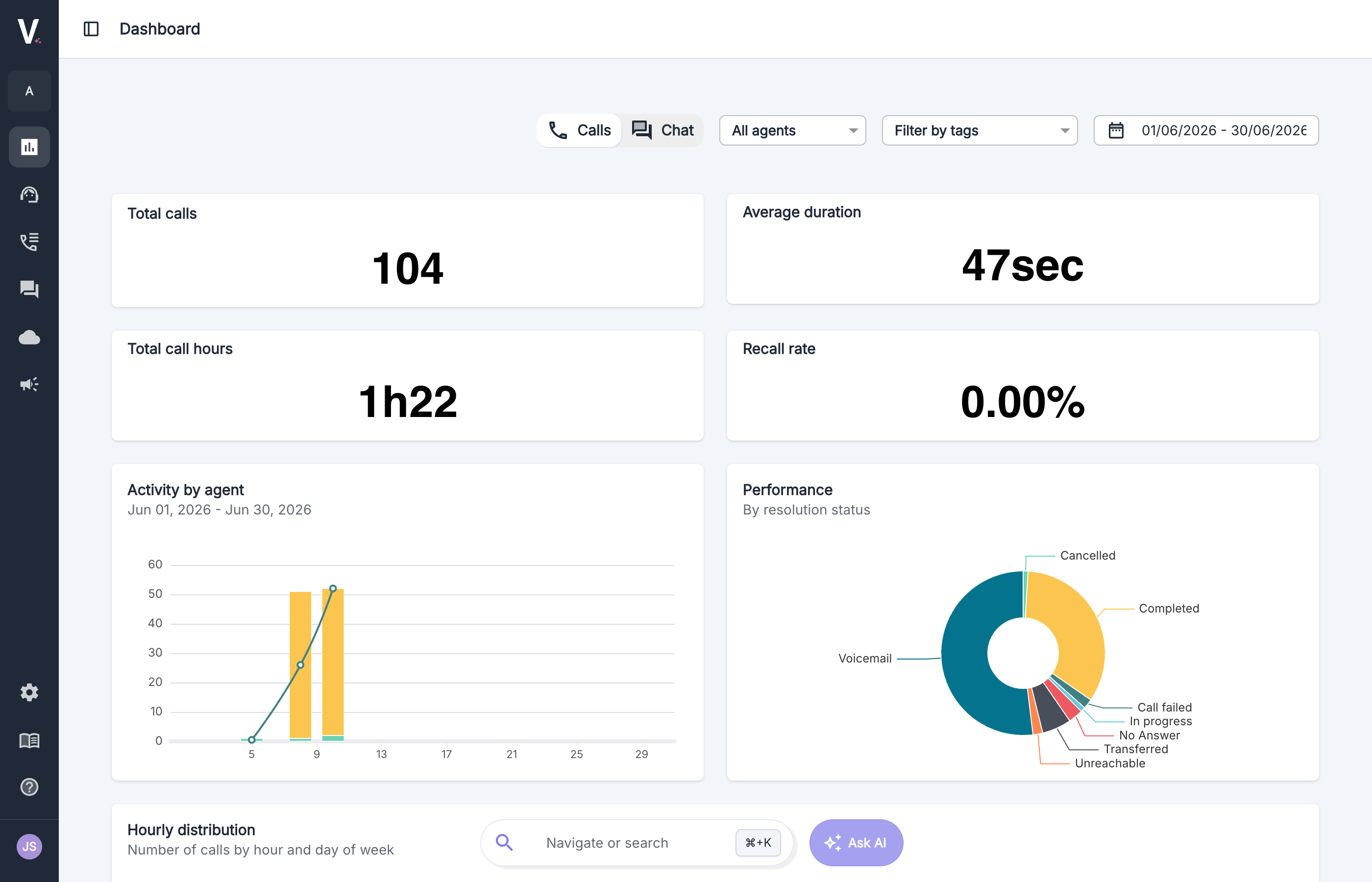
Period Selection
Filter the data by selecting specific start and end dates
Agent Filtering
View metrics for individual agents or for all your agents
Data Visualization
Analyze trends through interactive graphs and charts
Tag Filtering
Refine your analysis by filtering with segmentation or manual tags
Calls and chat dashboards
If the chatbot is enabled on your account and has handled at least one conversation, a Calls / Chat toggle appears in the filter bar. Calls is selected by default. Switching channel adapts the dashboard instead of only filtering it:- Voice-only indicators are hidden in Chat: total call hours and recall rate.
- Shared indicators are renamed to match the channel:
- Other indicators that apply to chat are kept, so you can compare both channels with the same reading grid.
The Chat toggle only appears once your chatbot has handled at least one conversation. Until then, the dashboard shows calls only.
Activity Visualization
Overview
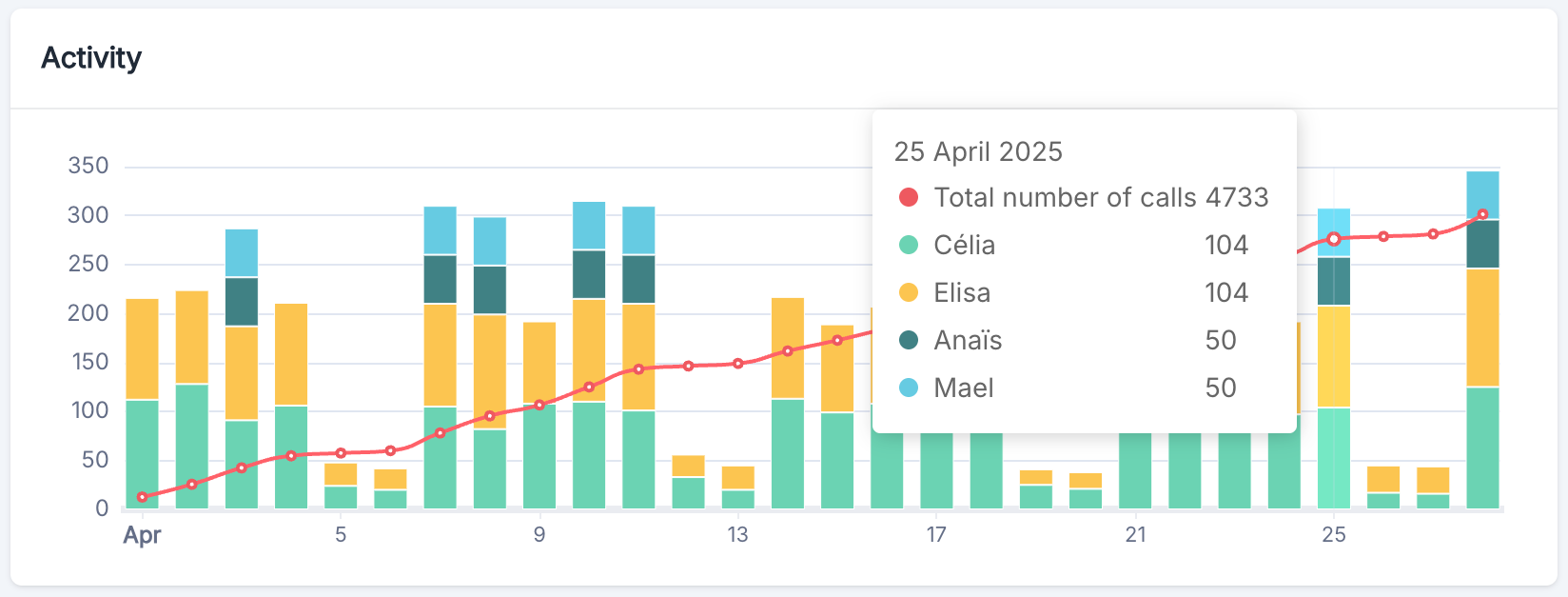
The activity graph is an essential tool for monitoring usage trends of your conversational agent system. It presents data in a combined chart displaying:- Stacked Bar Chart: Represents the daily distribution of activities by agent
- Trend Line: Indicates the cumulative evolution of interactions over the period, providing a clear visualization of platform usage growth
Trend Analysis
To make the most of this graph:- Identify Patterns: Analyze color distributions to understand call allocation
- Spot Anomalies: Detect unusual peaks or declines that require investigation
- Plan Resources: Use historical trends to anticipate future needs
- Measure Growth: Track the slope of the trend line to evaluate platform adoption
Key Indicators
Overview
The dashboard presents four key KPIs:Total calls
Number of calls handled by your AI agents over the selected period
Efficiency
This metric represents the average duration of each phone interaction handled by the system
Call Volume
This metric indicates the total accumulated time of voice communication handled by your AI agents
Recall rate
Share of calls coming from a phone number that had already called over the selected period
Call Volume Analysis
The total number of call hours is a crucial indicator that allows you to:- Measure the Load on the call processing system
- Plan Capacities based on usage trends
- Evaluate the Return on Investment of the Volubile platform
Average Duration Analysis
The average call duration reflects:- The Efficiency of Resolution of requests by your AI agents
- The Average Complexity of processed inquiries
- User Experience in terms of service speed
Recall rate analysis
The recall rate is the share of calls coming from a phone number that had already called over the selected period. It is only available on the calls dashboard. It is the best indicator of whether a request was actually resolved during the first call. Use it to:- Spot unresolved requests: a rise in the recall rate often means callers did not get what they needed the first time
- Find the causes: cross it with the category of the first call to identify the call reasons that generate the most recalls, then adjust your agent’s prompt or knowledge base
- Measure the effect of a change: compare the rate before and after an update to your agent
Calling back is not always a failure. On multi-step journeys (appointment booking, case follow-up), recalls are expected. Read this rate against your own history rather than against an absolute target.
Performance Distribution
Overview
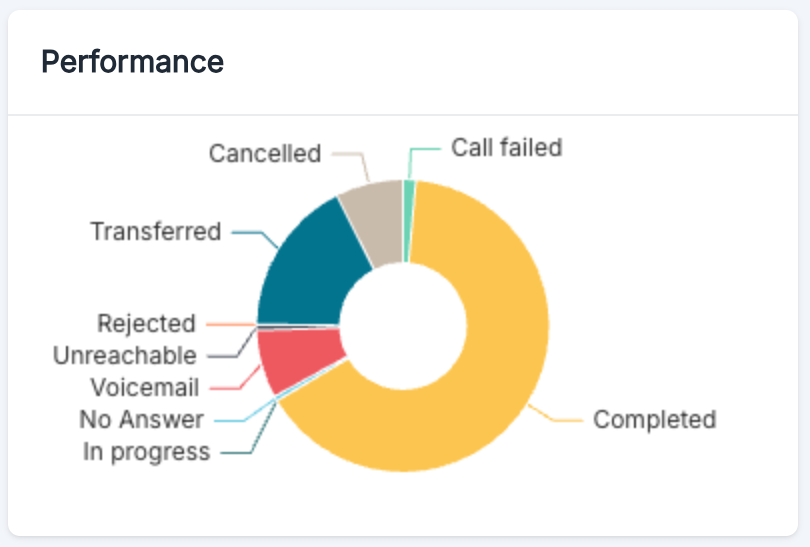
The performance distribution graph breaks down call results by their final status, providing insights into service quality and operational efficiency.- Completed: Calls that were successfully managed and concluded normally by the agent
- Call failed: Technical failures during the call attempt (network issues, system errors)
- Transferred: Calls that required transfer to a human agent or another service
- Cancelled: Calls that were explicitly hung up by the caller before the agent answered
- Rejected: Calls that were rejected by the system (premium rate number, international calls)
- Unreachable: Call attempts that went unanswered by the recipient
- No Answer: Numbers that could not be reached (busy line, phone turned off, etc.)
- Voicemail: Calls that reached a voicemail
- In Progress: Calls currently being processed by the system
- Handled by failover
Performance Interpretation
- High Completion Rates indicate effective call management
- Frequent Transfers may suggest knowledge gaps
- Failed Calls should be examined to identify technical issues
- High Unreachable Rates may indicate quality issues in the contact database
Call Categories
Overview
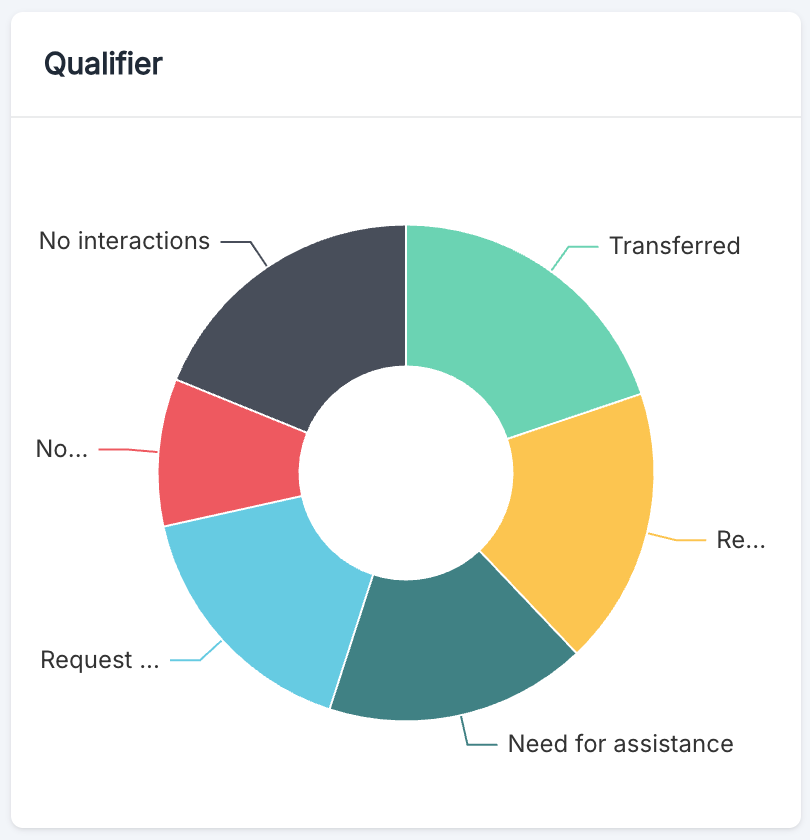
The Volubile call categories module provides an analytical perspective on the categorization patterns and outcomes of phone conversations managed by your AI agents. This visualization helps identify types of interactions and measures the efficiency of the system in categorizing calls.One chart per call category
Each call category configured on your agents now has its own bar chart, instead of a single combined chart. Each chart shows how calls are distributed across the labels of that category. This lets you read each axis of analysis on its own, for example call reason on one side and caller satisfaction on the other, without the labels of different categories being mixed together.Best Practices
To maximize the value of call category data:- Regularly Review Your Categories to adapt them to your evolving business
- Analyze Temporal Trends in label distribution
- Keep one question per category: since each category has its own chart, a category that answers a single question (reason, outcome, sentiment) produces a chart that is easier to read
Recent Calls Table
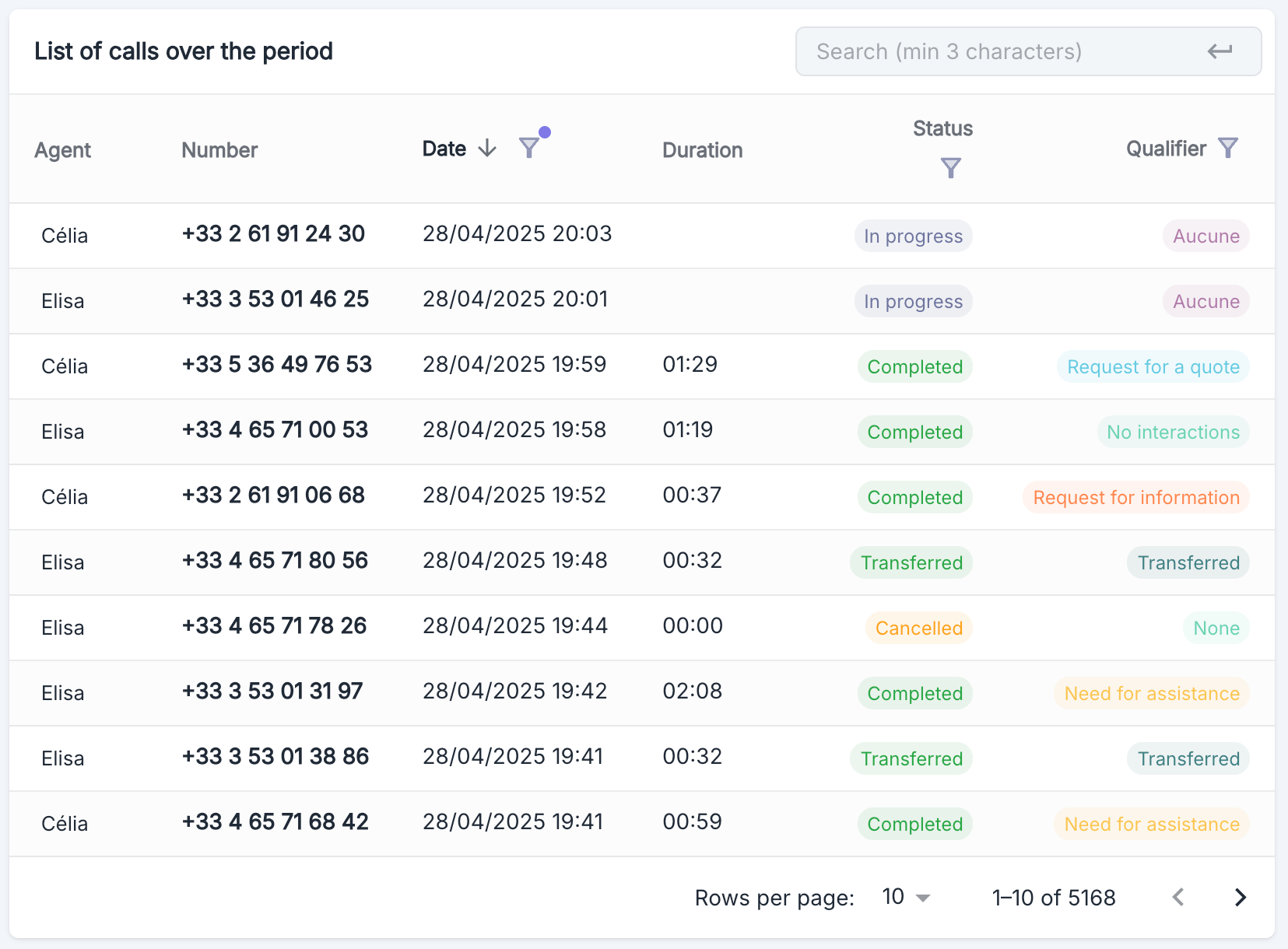
Table Structure
Calls Table
Use of the calls dashboard
Distribution Analysis
Monthly Distribution
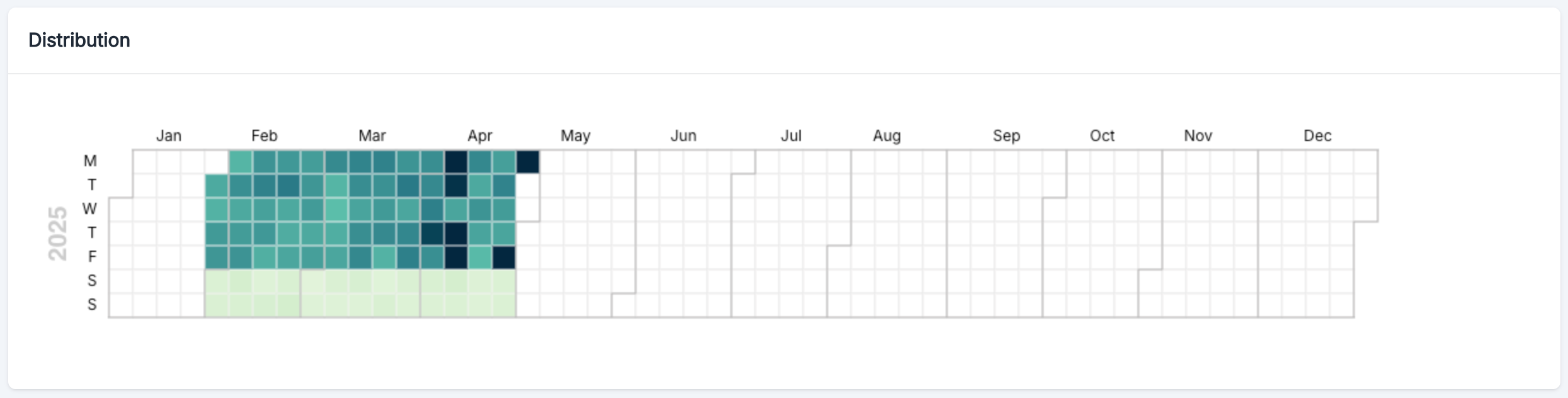
Overview
The calendar heatmap provides a visual representation of call volume patterns throughout the year where:- The horizontal axis represents the months of the year (January to December)
- The vertical axis represents the days of the week (Monday to Sunday)
- The intensity of the color indicates the volume of calls (darker = higher volume)
Practical Use Cases
The distribution visualization can be used to:- Identify Seasonal Peaks - Spot periods of the year when call volume significantly increases
- Analyze Weekly Trends - Observe which days of the week generate more activity
- Measure Campaign Impact - Assess the effects of marketing campaigns on call volume
Weekends (Saturday and Sunday) are often represented with a different intensity, generally indicating a reduced call volume compared to weekdays.
Hourly Distribution
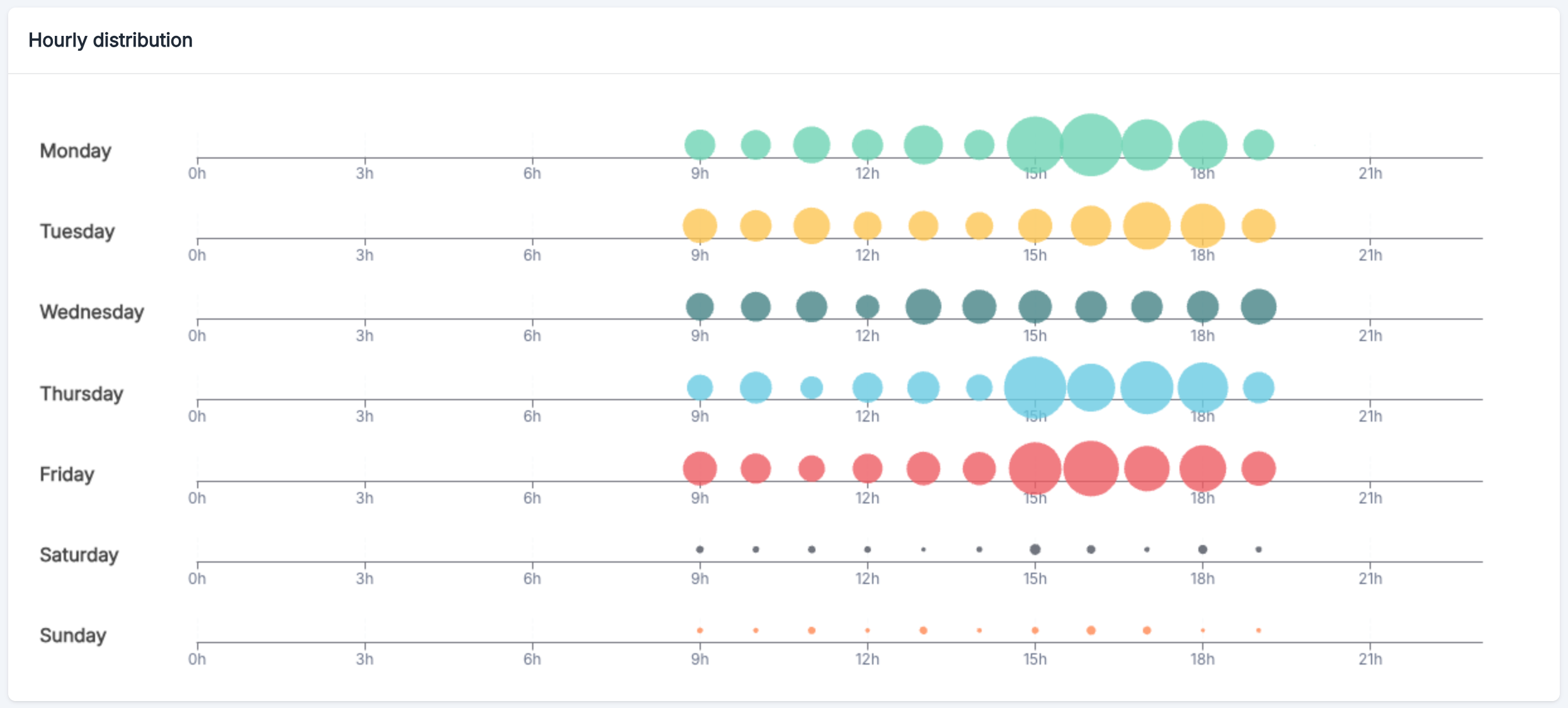
Overview
The hourly distribution graph reveals when your customers are most likely to call:- Weekdays: Highest volume between 9 AM and 6 PM
- Monday, Thursday, and Friday: Notable peak around 12 PM
- Weekend: Minimal call activity