> ## Documentation Index
> Fetch the complete documentation index at: https://docs.volubile.ai/llms.txt
> Use this file to discover all available pages before exploring further.
# Database (RAG)
> The **Database** (RAG, Retrieval-Augmented Generation) enriches your Volubile agents with your own knowledge. Import documents, index web pages, then refine the content fragment by fragment for accurate, up-to-date answers.
 ## Overview
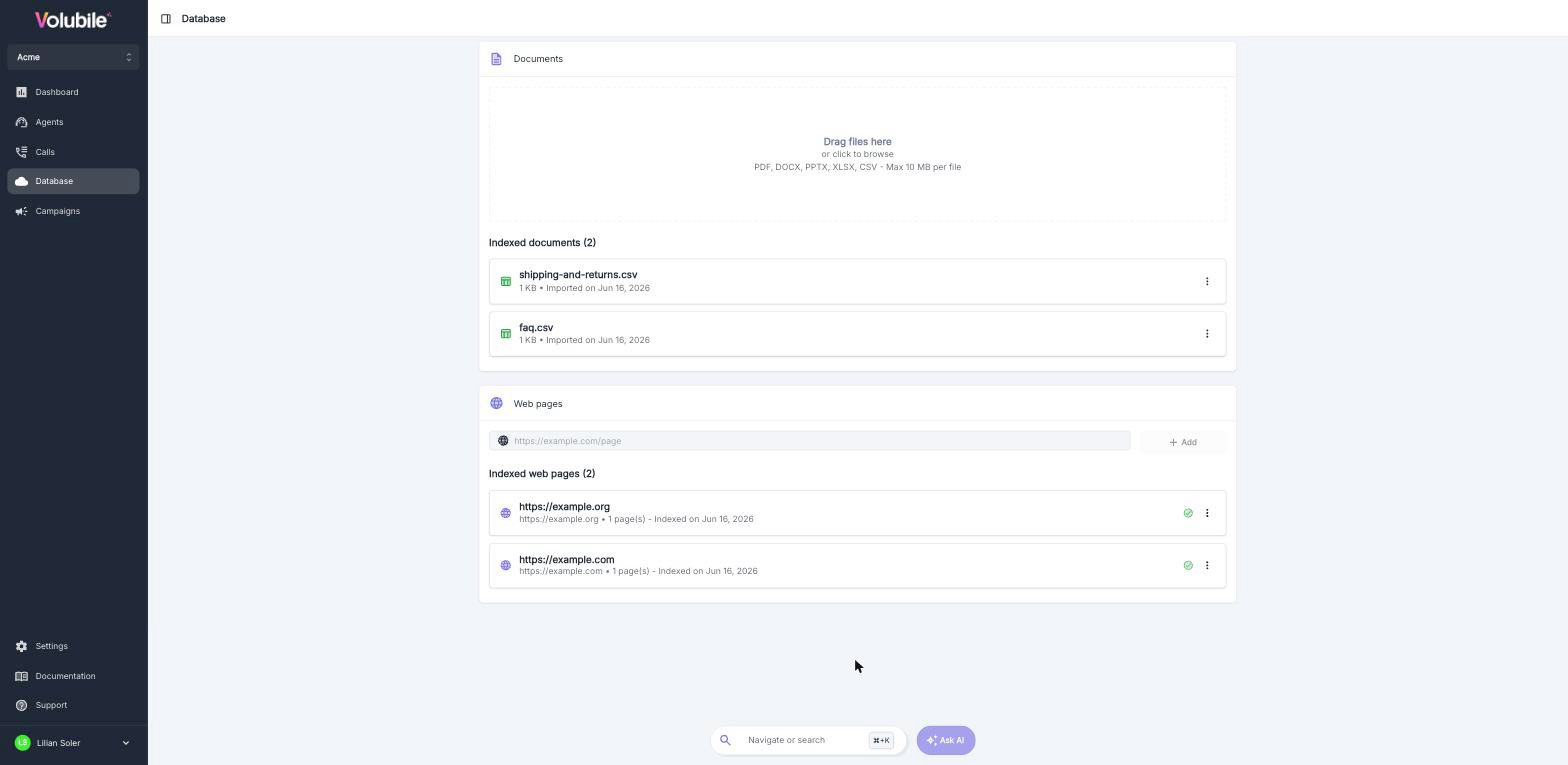
The **Database** section, available from the sidebar, centralizes the knowledge made available to your agents. It is organized into two complementary sources:
| Source | Description |
| ------------- | ----------------------------------------------------------------------- |
| **Documents** | Files you import (PDF, DOCX, PPTX, XLSX, CSV). |
| **Web pages** | Website pages indexed automatically by crawling, with optional refresh. |
Each source is split into **fragments**: the text excerpts the agent searches and cites to build its answers.
A single knowledge base is shared across the customer. Agents draw the information they need from it according to
their configuration.
## Documents
### Import a file
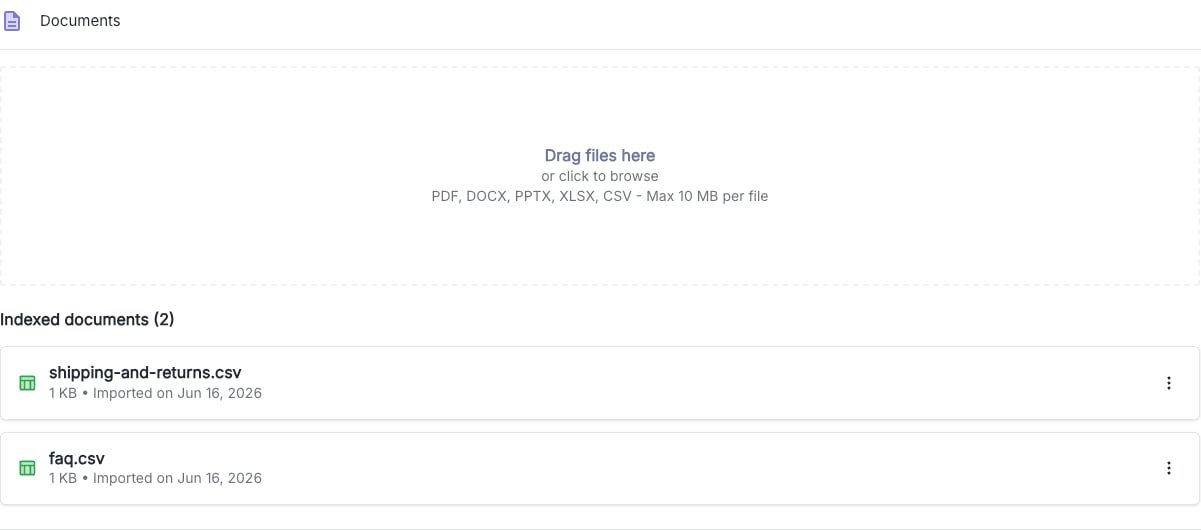
Drop your file into the dedicated area, or click it to browse your computer.
## Overview
The **Database** section, available from the sidebar, centralizes the knowledge made available to your agents. It is organized into two complementary sources:
| Source | Description |
| ------------- | ----------------------------------------------------------------------- |
| **Documents** | Files you import (PDF, DOCX, PPTX, XLSX, CSV). |
| **Web pages** | Website pages indexed automatically by crawling, with optional refresh. |
Each source is split into **fragments**: the text excerpts the agent searches and cites to build its answers.
A single knowledge base is shared across the customer. Agents draw the information they need from it according to
their configuration.
## Documents
### Import a file
Drop your file into the dedicated area, or click it to browse your computer.
 | Specification | Description |
| --------------------- | ----------------------------------------- |
| **Supported formats** | `PDF`, `DOCX`, `PPTX`, `XLSX`, `CSV` |
| **Maximum size** | 10 MB per file |
| **Row limit** | Up to 10,000 rows for Excel and CSV files |
| **Fragment size** | Up to 6,000 characters |
Once processed, the file appears in the **Indexed documents** list, with its name, size and import date. Indexing may take a moment: a status indicator shows its progress.
### Document actions
The menu on the right of each document gives access to the following actions:
| Action | Description |
| ---------------- | ------------------------------------------------------------------ |
| **Download** | Exports the document content to Excel (limited to 10,000 records). |
| **Replace file** | Imports a new file in place of the current one. |
| **Delete** | Removes the document and all its fragments from the base. |
### Replace a file
Replacing re-indexes the document entirely from the new file.
All existing fragments for this document will be **deleted** and replaced with the content of the new file. Any
manual edits made to the fragments will be lost.
If you import a file with the same name as an existing document, Volubile offers to **replace** the existing
document rather than create a duplicate.
## Managing fragments
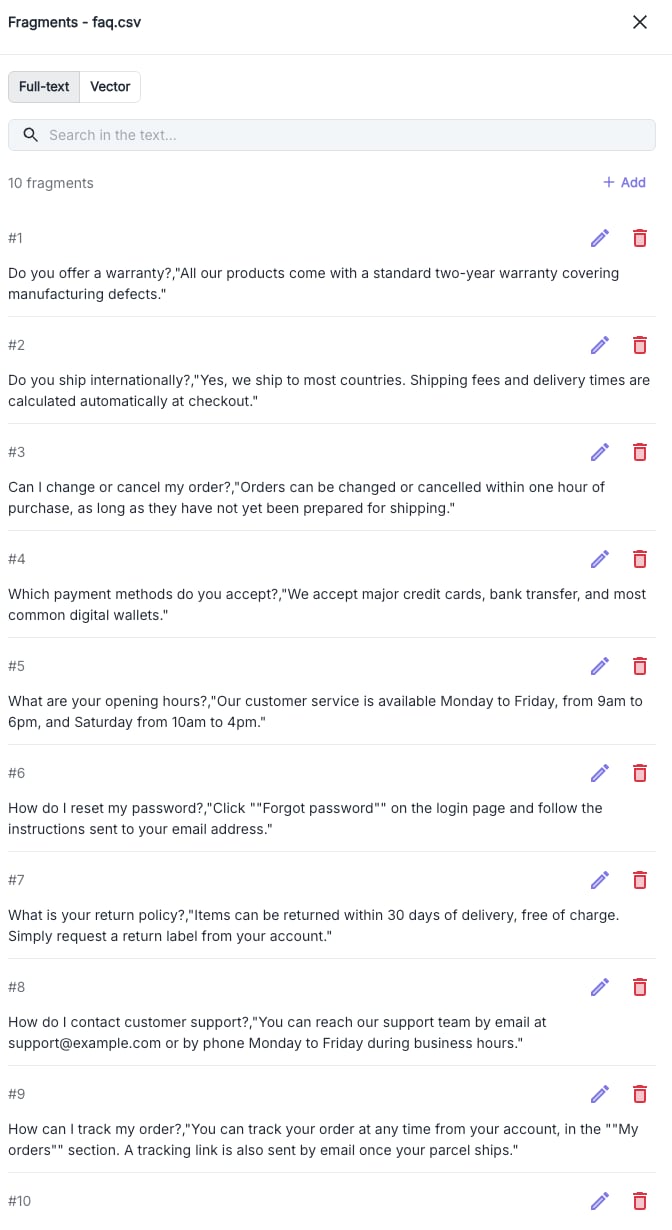
Click a document to open the side panel and review its **fragments**.
| Specification | Description |
| --------------------- | ----------------------------------------- |
| **Supported formats** | `PDF`, `DOCX`, `PPTX`, `XLSX`, `CSV` |
| **Maximum size** | 10 MB per file |
| **Row limit** | Up to 10,000 rows for Excel and CSV files |
| **Fragment size** | Up to 6,000 characters |
Once processed, the file appears in the **Indexed documents** list, with its name, size and import date. Indexing may take a moment: a status indicator shows its progress.
### Document actions
The menu on the right of each document gives access to the following actions:
| Action | Description |
| ---------------- | ------------------------------------------------------------------ |
| **Download** | Exports the document content to Excel (limited to 10,000 records). |
| **Replace file** | Imports a new file in place of the current one. |
| **Delete** | Removes the document and all its fragments from the base. |
### Replace a file
Replacing re-indexes the document entirely from the new file.
All existing fragments for this document will be **deleted** and replaced with the content of the new file. Any
manual edits made to the fragments will be lost.
If you import a file with the same name as an existing document, Volubile offers to **replace** the existing
document rather than create a duplicate.
## Managing fragments
Click a document to open the side panel and review its **fragments**.
 ### Searching fragments
Two search modes are available:
| Mode | Description |
| ------------- | ----------------------------------------------------------------------------------------------- |
| **Full-text** | Classic text search over fragment content. |
| **Vector** | Semantic search: the fragments closest in meaning to your query, ranked by relevance **score**. |
### Editing content
Each fragment can be managed individually:
| Action | Description |
| ------------------------------------------------------- | ------------------------------------------------------------------- |
| **Add** | The **Add** button creates a new fragment (up to 6,000 characters). |
| **Edit** | Edits the fragment content inline. |
| **Delete** | Permanently removes the fragment. |
Manually refining fragments is the best way to improve answer quality: rephrase, split or enrich excerpts so they
match the real questions your users ask.
## Web pages
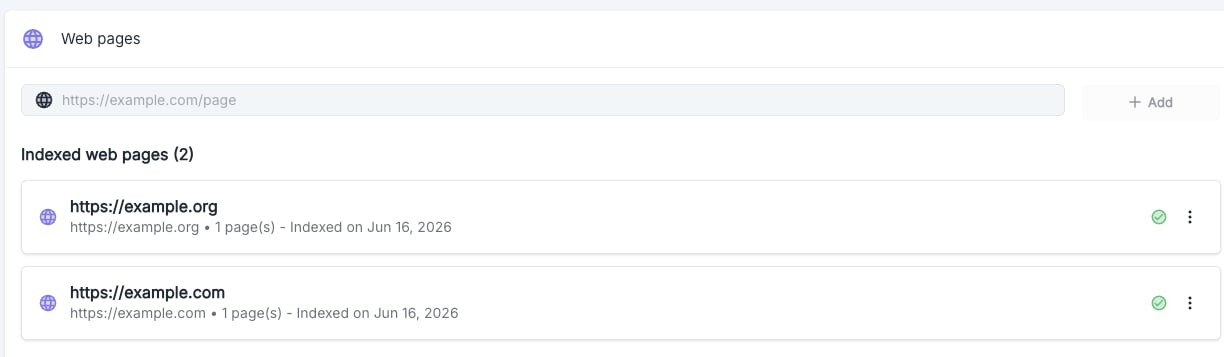
In addition to files, you can index the content of web pages. Enter a URL, then click **Add**.
### Searching fragments
Two search modes are available:
| Mode | Description |
| ------------- | ----------------------------------------------------------------------------------------------- |
| **Full-text** | Classic text search over fragment content. |
| **Vector** | Semantic search: the fragments closest in meaning to your query, ranked by relevance **score**. |
### Editing content
Each fragment can be managed individually:
| Action | Description |
| ------------------------------------------------------- | ------------------------------------------------------------------- |
| **Add** | The **Add** button creates a new fragment (up to 6,000 characters). |
| **Edit** | Edits the fragment content inline. |
| **Delete** | Permanently removes the fragment. |
Manually refining fragments is the best way to improve answer quality: rephrase, split or enrich excerpts so they
match the real questions your users ask.
## Web pages
In addition to files, you can index the content of web pages. Enter a URL, then click **Add**.
 ### Crawl configuration
Adding a URL opens the crawl configuration window.
### Crawl configuration
Adding a URL opens the crawl configuration window.
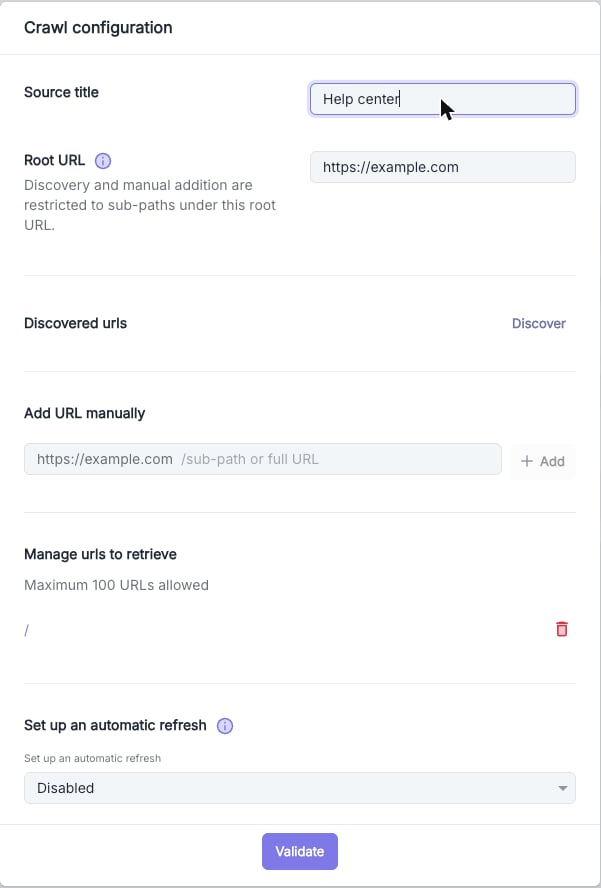 Give the web source a recognizable name (required).
The site's root URL. Discovery and manual URL additions are restricted to sub-paths under this root URL.
Use **Discover** to automatically detect pages on the domain, or add sub-paths manually. Up to 100 URLs per source.
Enable a recurrence (**daily**, **weekly** or **monthly**) so the pages are re-indexed regularly.
Automatic refresh re-indexes **all** pages of the source. If you manually edited some fragments from these pages,
those changes will be lost.
### Tracking indexed pages
Each web source displays its title, URL, page count and indexing date, along with a status indicator:
| Status | Meaning |
| ----------------------------------------------------- | -------------------------------- |
| Success | Indexing completed successfully. |
| In progress | The crawl is being processed. |
| Error | Indexing failed. |
The menu on each source lets you **configure** the crawl, **refresh** it, or **delete** the source. As with documents, click a source to review its crawled pages and their fragments (**Fragments** and **Markdown** views).
## Deleting a source
Deleting a document or a web source is **irreversible**.
If the source is used by one or more agents, deletion is blocked. Volubile shows the list of affected agents:
remove the source from their configuration first before you can delete it.
Give the web source a recognizable name (required).
The site's root URL. Discovery and manual URL additions are restricted to sub-paths under this root URL.
Use **Discover** to automatically detect pages on the domain, or add sub-paths manually. Up to 100 URLs per source.
Enable a recurrence (**daily**, **weekly** or **monthly**) so the pages are re-indexed regularly.
Automatic refresh re-indexes **all** pages of the source. If you manually edited some fragments from these pages,
those changes will be lost.
### Tracking indexed pages
Each web source displays its title, URL, page count and indexing date, along with a status indicator:
| Status | Meaning |
| ----------------------------------------------------- | -------------------------------- |
| Success | Indexing completed successfully. |
| In progress | The crawl is being processed. |
| Error | Indexing failed. |
The menu on each source lets you **configure** the crawl, **refresh** it, or **delete** the source. As with documents, click a source to review its crawled pages and their fragments (**Fragments** and **Markdown** views).
## Deleting a source
Deleting a document or a web source is **irreversible**.
If the source is used by one or more agents, deletion is blocked. Volubile shows the list of affected agents:
remove the source from their configuration first before you can delete it.