> ## Documentation Index
> Fetch the complete documentation index at: https://docs.volubile.ai/llms.txt
> Use this file to discover all available pages before exploring further.
# Configuration
> Activate and customize the chatbot widget that exposes your Volubile agent on a web chat channel.
The chatbot extends a Volubile agent to a text channel on your website through an embeddable widget. The same agent powers both the voice and the chat channels, ensuring that its knowledge and behavior remain consistent across every interaction. Because a chat conversation does not rely on speech recognition or speech synthesis, messages are handled directly by the language model.
Because the same agent serves both channels, you can adapt its prompt to the channel using the `system.conversationType` variable (`call` or `chat`). See [Adapting the prompt to the channel](/en/product/prompt/context#adapting-the-prompt-to-the-channel).
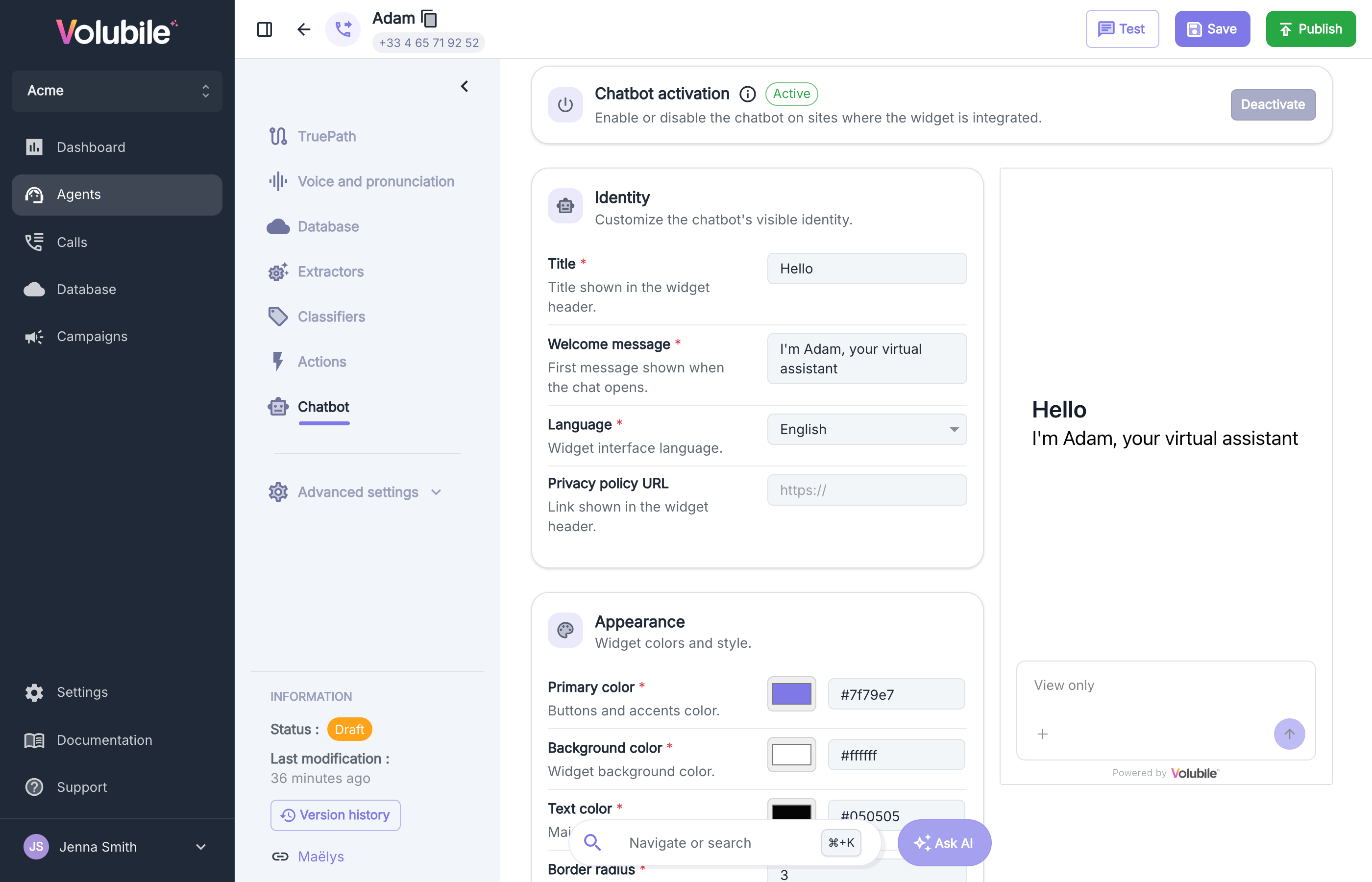
Configuration is performed from the **Chatbot** section of your agent. As you edit the settings, a live preview of the widget is displayed on the right of the screen, in floating mode and read-only, so you can assess your changes before publishing them.
 ## Activation
Use the activation control at the top of the section to enable or disable the chatbot for the agent. When the chatbot is disabled, the widget is no longer served on your website. The configuration below is preserved and applied again as soon as the chatbot is reactivated.
## Identity
Define how the chatbot presents itself to your users.
| Field | Description |
| ---------------------- | ----------------------------------------------------------------------------------- |
| **Title** | The name displayed at the top of the chat window. |
| **Welcome message** | The first message shown to the user when a conversation begins. |
| **Language** | The language of the widget interface. English and French are supported. |
| **Privacy policy URL** | An optional link to your privacy policy, made available to users within the widget. |
## Appearance
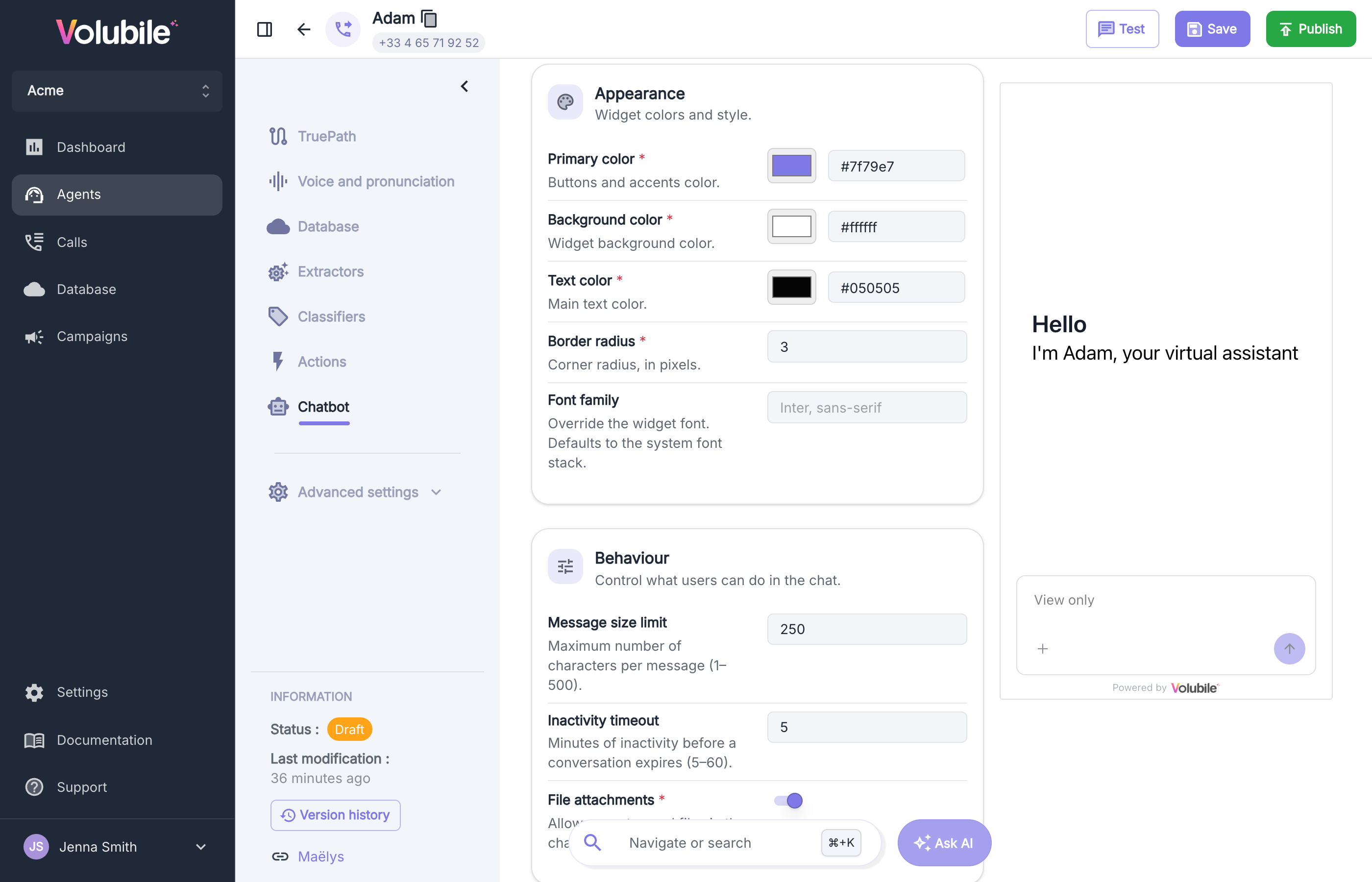
Align the widget with your brand identity.
| Field | Description |
| -------------------- | ----------------------------------------------------------------------------------------------------------------------------------------------------------- |
| **Primary color** | The main accent color, applied to interactive elements. |
| **Background color** | The background color of the chat window. |
| **Text color** | The color of the message text. |
| **Border radius** | The corner rounding of the widget, expressed in pixels. |
| **Font family** | An optional CSS font family, for example `Inter, sans-serif`. The font must already be available on the host website — the widget does not load it for you. |
## Activation
Use the activation control at the top of the section to enable or disable the chatbot for the agent. When the chatbot is disabled, the widget is no longer served on your website. The configuration below is preserved and applied again as soon as the chatbot is reactivated.
## Identity
Define how the chatbot presents itself to your users.
| Field | Description |
| ---------------------- | ----------------------------------------------------------------------------------- |
| **Title** | The name displayed at the top of the chat window. |
| **Welcome message** | The first message shown to the user when a conversation begins. |
| **Language** | The language of the widget interface. English and French are supported. |
| **Privacy policy URL** | An optional link to your privacy policy, made available to users within the widget. |
## Appearance
Align the widget with your brand identity.
| Field | Description |
| -------------------- | ----------------------------------------------------------------------------------------------------------------------------------------------------------- |
| **Primary color** | The main accent color, applied to interactive elements. |
| **Background color** | The background color of the chat window. |
| **Text color** | The color of the message text. |
| **Border radius** | The corner rounding of the widget, expressed in pixels. |
| **Font family** | An optional CSS font family, for example `Inter, sans-serif`. The font must already be available on the host website — the widget does not load it for you. |
 ## Behaviour
Control how the widget behaves during a conversation.
| Field | Description |
| ---------------------- | --------------------------------------------------------------------------------------- |
| **Message size limit** | The maximum number of characters allowed per user message. |
| **Inactivity timeout** | The duration, in minutes, after which an inactive conversation is automatically closed. |
| **Attachments** | When enabled, users may send file attachments within the conversation. |
## Security
Restrict where the widget may be loaded.
| Field | Description |
| ------------------- | ----------------------------------------------------------------------------------- |
| **Allowed origins** | Domains authorized to host the widget. Any request from another origin is rejected. |
Once your configuration is complete, proceed to [Integration](/en/product/chatbot/integration) to install the widget on your website.
## Behaviour
Control how the widget behaves during a conversation.
| Field | Description |
| ---------------------- | --------------------------------------------------------------------------------------- |
| **Message size limit** | The maximum number of characters allowed per user message. |
| **Inactivity timeout** | The duration, in minutes, after which an inactive conversation is automatically closed. |
| **Attachments** | When enabled, users may send file attachments within the conversation. |
## Security
Restrict where the widget may be loaded.
| Field | Description |
| ------------------- | ----------------------------------------------------------------------------------- |
| **Allowed origins** | Domains authorized to host the widget. Any request from another origin is rejected. |
Once your configuration is complete, proceed to [Integration](/en/product/chatbot/integration) to install the widget on your website.