> ## Documentation Index
> Fetch the complete documentation index at: https://docs.volubile.ai/llms.txt
> Use this file to discover all available pages before exploring further.
# Data Extraction
> Extractors are a key feature of Volubile that enables your voice agents to identify and automatically collect specific information during phone conversations.
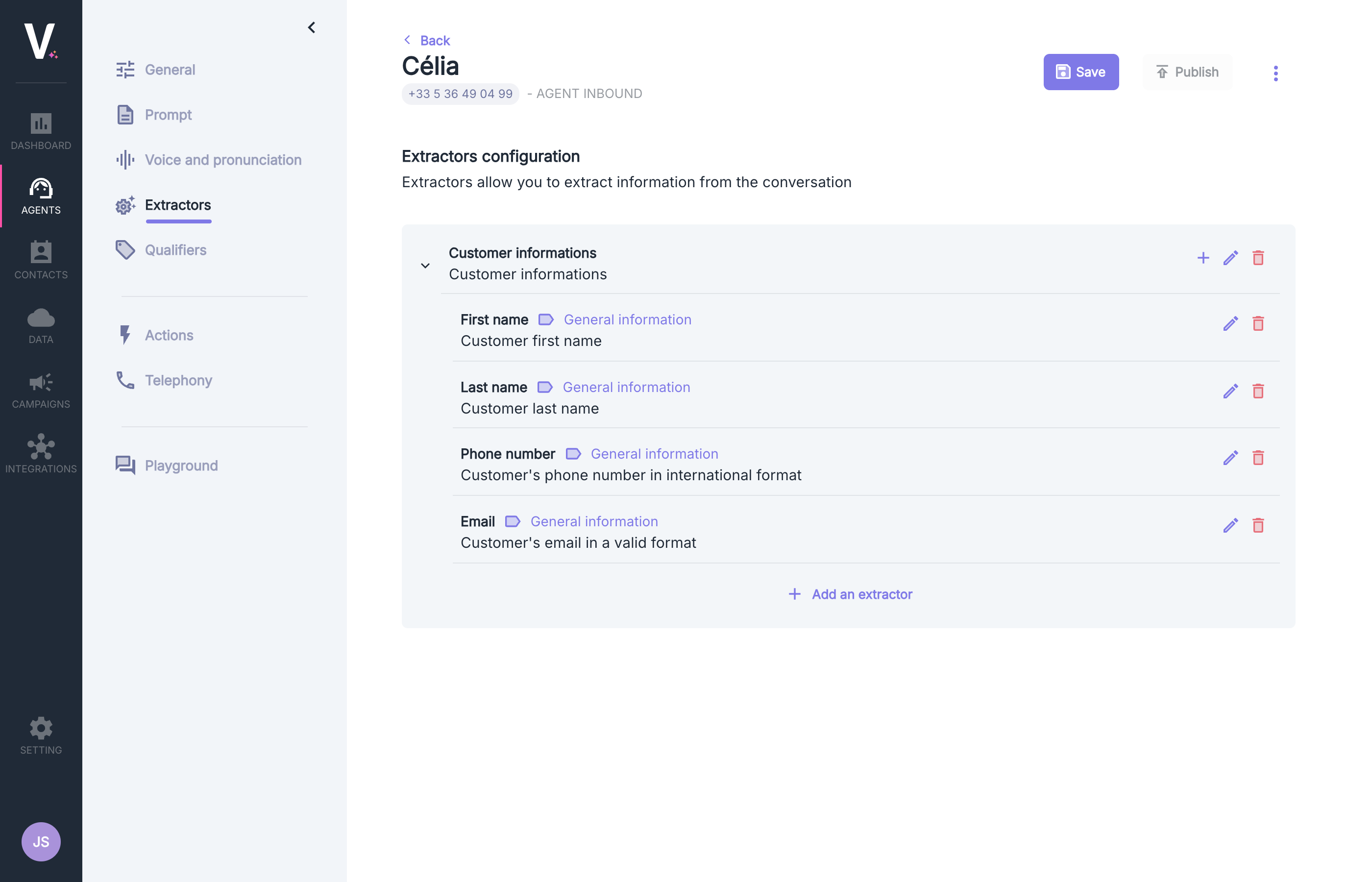 ## Structure of an Extractor
Each extractor in Volubile consists of three fundamental elements:
Unique identifier used to reference the extractor in your system
Detailed explanation of the data to be extracted, serving as a guide for the AI model
Category of extractor defining its behavior and capabilities
## Types of Extractors
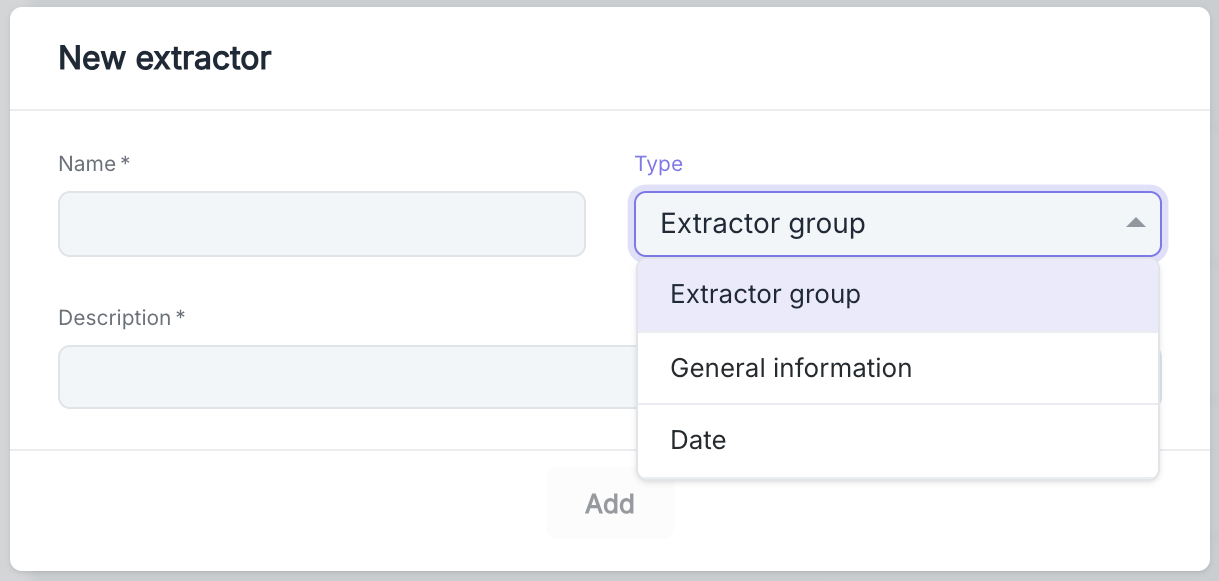
Volubile offers three distinct types of extractors, each suited to specific needs:
### General Information
Standard type of extractor that captures simple textual information such as names, phone numbers, emails, or references.
Examples of use:
* Customer's first name
* Last name
* Phone number
* Email address
* Customer reference
### Date
Specialized extractor for identifying and properly formatting temporal information mentioned during the conversation.
Examples of use:
* Appointment date
* Date of birth
* Availability period
* Desired deadline
### Extractor Group
Special type that allows logically grouping several related extractors into a single entity. An Extractor Group can contain other extractors of all types.
Examples of use:
* Complete contact details (grouping name, phone, email)
* Delivery information (grouping address, date, time slot)
* Booking details (grouping date, number of people, preferences)
## Configuration Interface
To create a new extractor, follow these steps:
1. Go to the "Extractors" tab in your Volubile dashboard
2. Click on the Add Extractor button (represented by the "+" icon)
3. Fill out the configuration form
## Structure of an Extractor
Each extractor in Volubile consists of three fundamental elements:
Unique identifier used to reference the extractor in your system
Detailed explanation of the data to be extracted, serving as a guide for the AI model
Category of extractor defining its behavior and capabilities
## Types of Extractors
Volubile offers three distinct types of extractors, each suited to specific needs:
### General Information
Standard type of extractor that captures simple textual information such as names, phone numbers, emails, or references.
Examples of use:
* Customer's first name
* Last name
* Phone number
* Email address
* Customer reference
### Date
Specialized extractor for identifying and properly formatting temporal information mentioned during the conversation.
Examples of use:
* Appointment date
* Date of birth
* Availability period
* Desired deadline
### Extractor Group
Special type that allows logically grouping several related extractors into a single entity. An Extractor Group can contain other extractors of all types.
Examples of use:
* Complete contact details (grouping name, phone, email)
* Delivery information (grouping address, date, time slot)
* Booking details (grouping date, number of people, preferences)
## Configuration Interface
To create a new extractor, follow these steps:
1. Go to the "Extractors" tab in your Volubile dashboard
2. Click on the Add Extractor button (represented by the "+" icon)
3. Fill out the configuration form
 ### Organizing Extractors
Extractors can be hierarchically structured to reflect the logical structure of the information to be collected:
* **First-level Extractors**: Represent general categories of information
* **Sub-extractors**: Detail specific points within a category
### Organizing Extractors
Extractors can be hierarchically structured to reflect the logical structure of the information to be collected:
* **First-level Extractors**: Represent general categories of information
* **Sub-extractors**: Detail specific points within a category
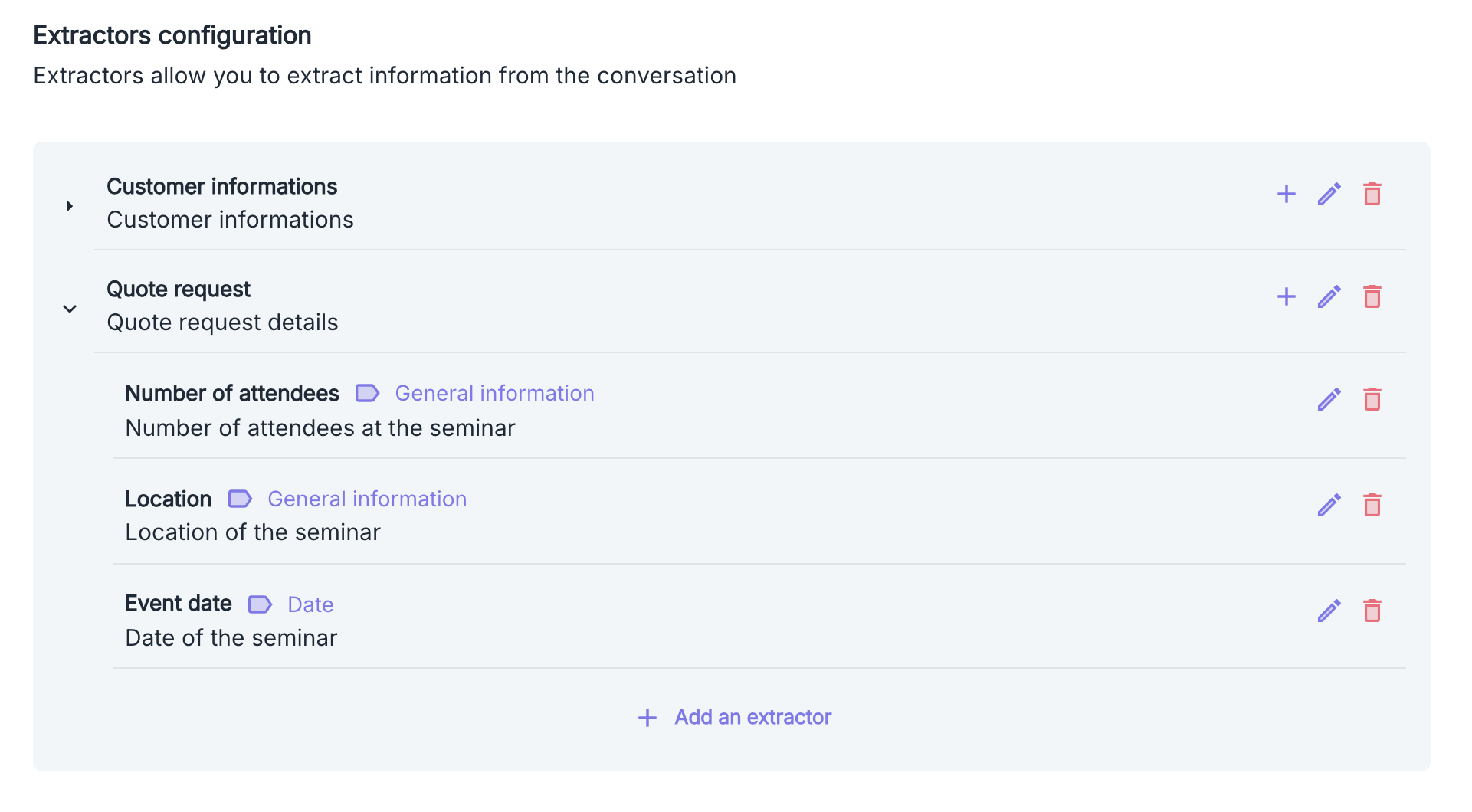 In the illustrated example, we have configured:
1. **Customer Information** - A group extractor for customer data
2. **Quote Request** - A group extractor for quote requests, containing three sub-extractors:
* **Number of Attendees** (Type: General Information) - Captures the number of participants in the seminar
* **Location** (Type: General Information) - Records the seminar location
* **Event Date** (Type: Date) - Identifies the planned date for the event
For changes to take effect, you need to publish the new configuration by clicking the **Publish** button after saving it.
In the illustrated example, we have configured:
1. **Customer Information** - A group extractor for customer data
2. **Quote Request** - A group extractor for quote requests, containing three sub-extractors:
* **Number of Attendees** (Type: General Information) - Captures the number of participants in the seminar
* **Location** (Type: General Information) - Records the seminar location
* **Event Date** (Type: Date) - Identifies the planned date for the event
For changes to take effect, you need to publish the new configuration by clicking the **Publish** button after saving it.